Word Study
Word Study helps you look behind an English Bible word and see the Greek or Hebrew words that can be translated that way. You can compare meanings, usage, authors, Bible books, and example passages without needing to know Greek or Hebrew first.
What Word Study does
Section titled “What Word Study does”An English word does not always match one Greek or Hebrew word. The same English word may represent several original words, and one original word may be translated in several ways.
Word Study starts with an English word, such as love, grace, or faith, or with an exact Strong’s number. It then shows the matching original-language entries, along with definitions, frequency information, author patterns, and example verses.
Use these results as a way to begin closer study. A word’s meaning still depends on the sentence, passage, book, and message in which it appears.
When you might use it
Section titled “When you might use it”- Compare the Greek or Hebrew words behind an English translation.
- Learn what an original word means and hear it pronounced.
- See which biblical authors or books use a word most often.
- Find example passages that use a particular original word.
- Explore related words from the same word family.
- Create a PDF summary for personal study, teaching, or sermon preparation.
Where to find Word Study
Section titled “Where to find Word Study”- Open the main GospelGrasp menu.
- Tap Word Study.
The Word Study screen has its own field labeled Search a word or Strong’s number. A Strong’s number is a reference number used to identify a particular Greek or Hebrew dictionary entry. The search control in the top navigation remains available for opening a Bible book, chapter, verse, or verse range.
See it in GospelGrasp
Section titled “See it in GospelGrasp”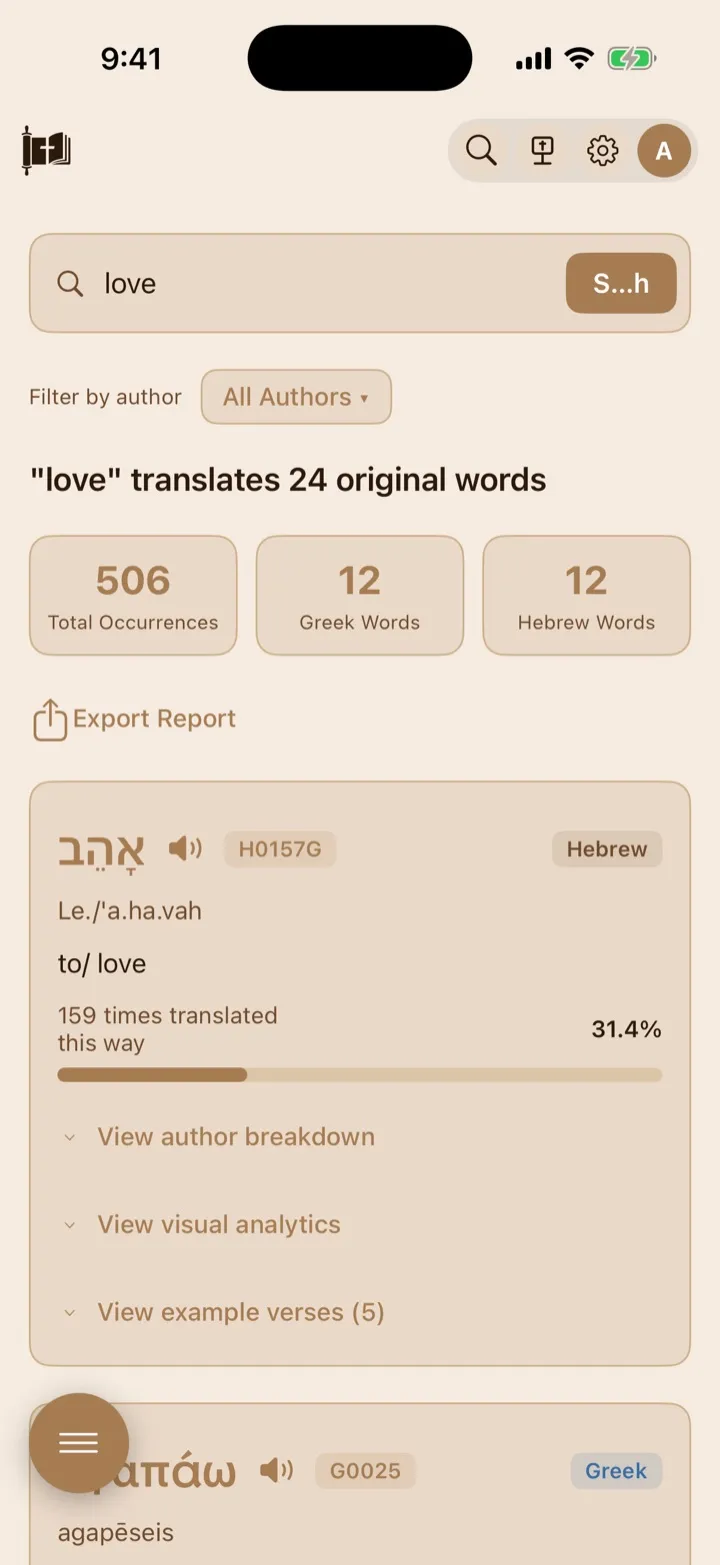
Enter an English word to find its related Greek and Hebrew words.
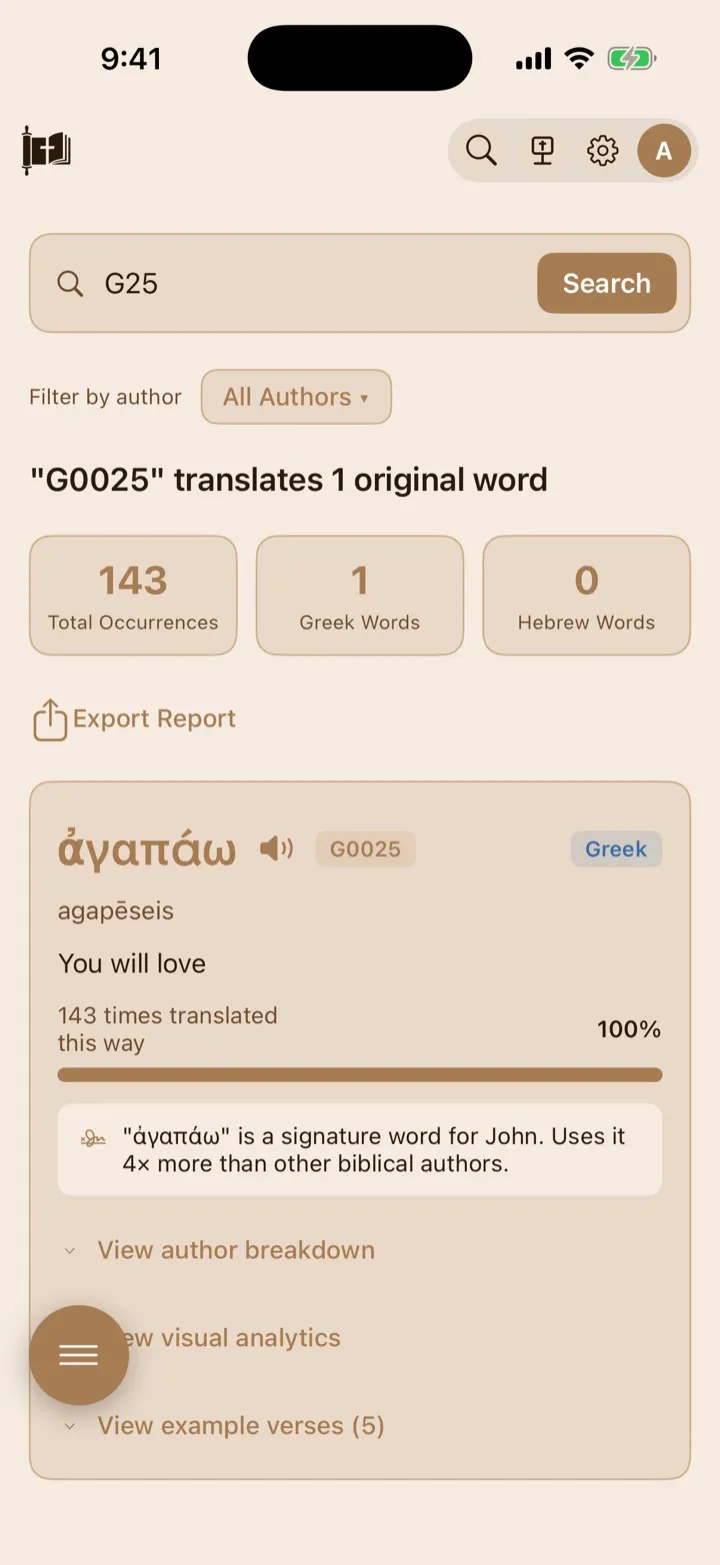
You can also search with an exact Greek or Hebrew Strong’s number.
The summary shows total occurrences and the original words represented in the results.
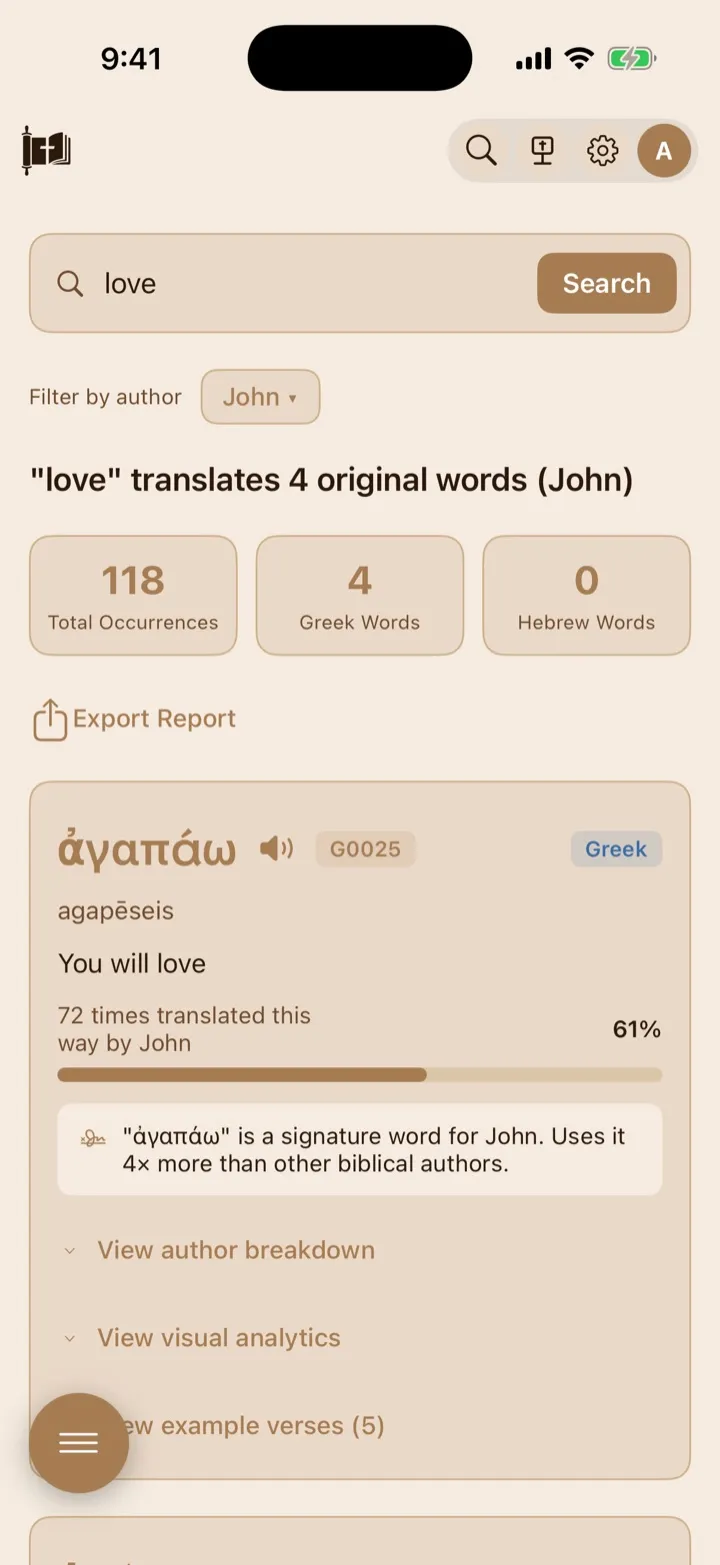
Filtering by author recalculates the results and can reveal author insights.
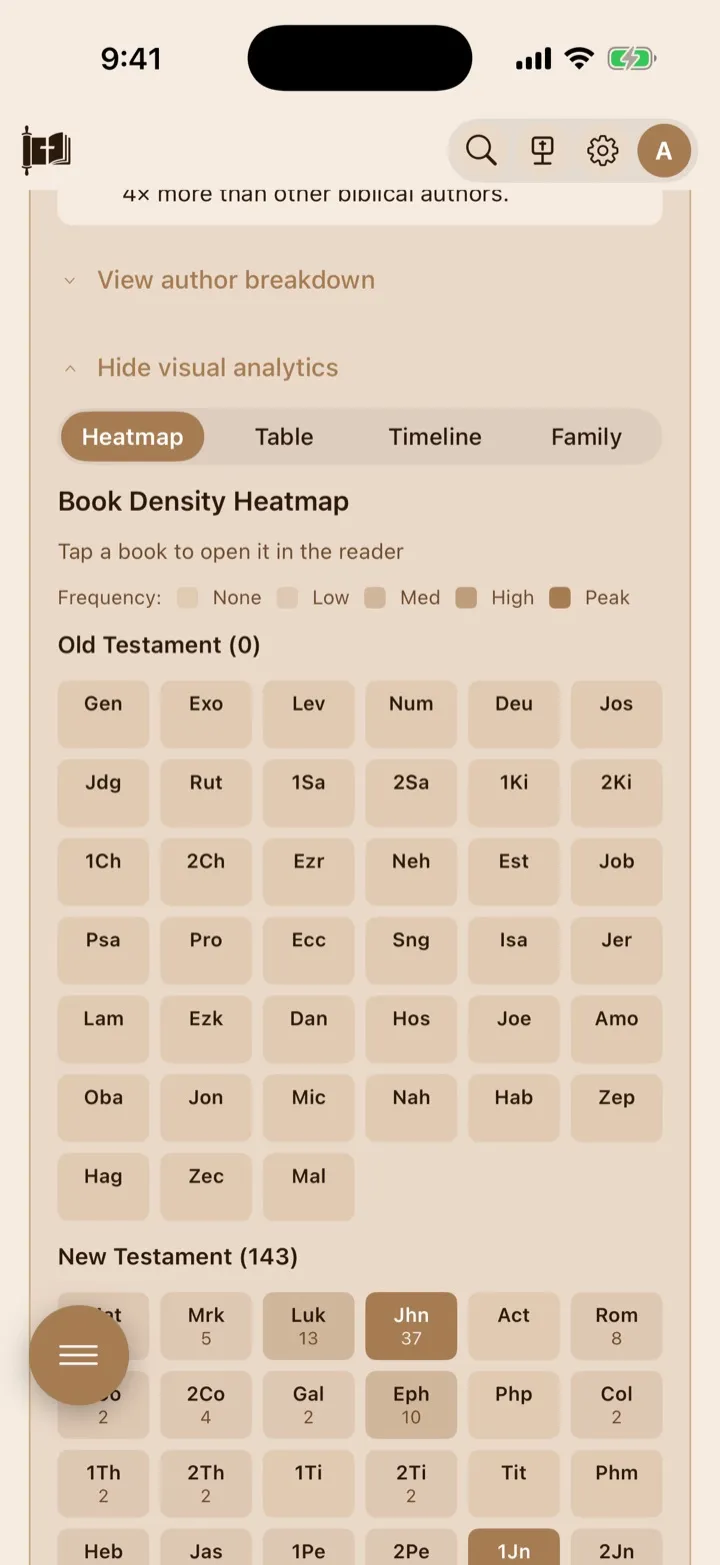
Visual analytics helps you compare where a word appears across Scripture.
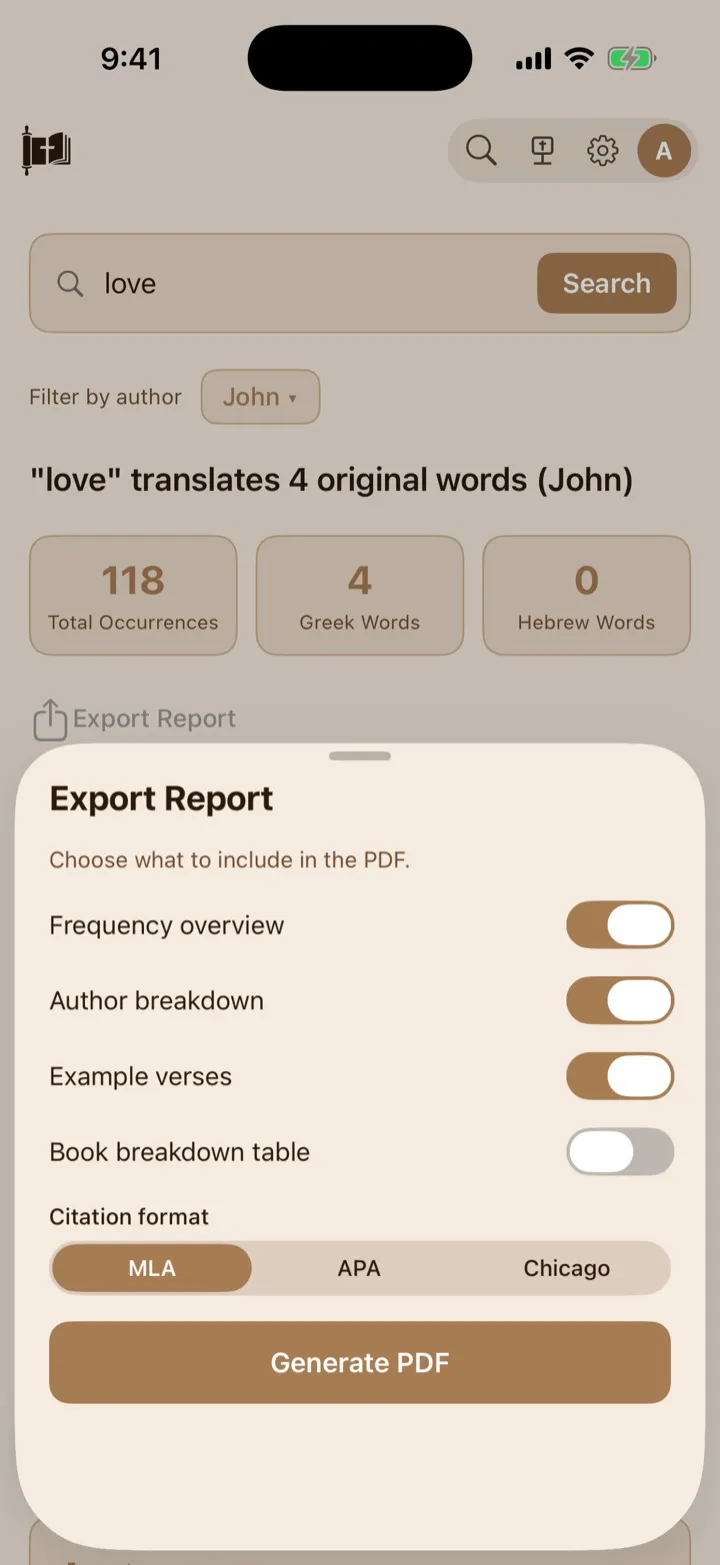
Choose the report sections and citation format before generating the PDF.
Start a Word Study
Section titled “Start a Word Study”- Tap Search a word or Strong’s number.
- Enter an English word or an exact Strong’s number.
- Tap Search, or press Search on the keyboard.
You can also tap one of the suggested words shown when the screen first opens: love, grace, faith, righteousness, salvation, or peace.
For a Strong’s-number search, enter G for a Greek entry or H for a Hebrew entry, followed by its number. For example, G25 and G0025 open the same exact Greek entry. Lowercase input also works.
Word Study does not currently accept Greek or Hebrew text, a Greek or Hebrew dictionary form, or a transliteration as a direct search.
A single, meaningful English word usually gives the clearest result. Very common connecting words, such as the or and, may return no results. The search field accepts no more than 100 characters.
Understand the results summary
Section titled “Understand the results summary”The heading tells you how many original words are connected to your English search. The three summary cards show:
- Total Occurrences: how many matching uses were found;
- Greek Words: how many Greek word entries appear in the results; and
- Hebrew Words: how many Hebrew word entries appear in the results.
An occurrence is one place where a word appears in the underlying Bible word information. The Greek and Hebrew totals count distinct original-word entries, not the number of verses.
If you filter the study by author, GospelGrasp recalculates the displayed results and totals for that author.
Read an original-word card
Section titled “Read an original-word card”Each result card represents one original Greek or Hebrew word. It can show:
- the original word;
- a speaker button for pronunciation;
- its Strong’s number;
- whether it is Greek or Hebrew;
- its transliteration;
- a short definition;
- how often it appears in the available text; and
- its percentage of all matches for that search.
A lemma is the dictionary form of a Greek or Hebrew word. A transliteration writes that word with English letters to help you read it. Numbers beginning with G identify Greek entries, and numbers beginning with H identify Hebrew entries.
The percentage bar compares this original word with the other original words returned by your current search. It does not say how important the word is or what percentage of the entire Bible it represents.
Tap the original word at the top of a card to open a larger detail sheet. The sheet repeats its original spelling, transliteration, Strong’s number, language, definition, occurrence count, and percentage.
Hear a pronunciation
Section titled “Hear a pronunciation”Tap the speaker button beside an original word to hear it pronounced. A speaker button also appears beside supported words in the larger detail sheet and the Family view.
GospelGrasp uses a recorded pronunciation where one is available. It can use a built-in device voice as a fallback. If neither option is available for a word, the speaker button does not appear.
See Reader Appearance and Study-Aid Settings for pronunciation settings and download options.
Filter the full study by author
Section titled “Filter the full study by author”Use Filter by author above the results to focus the entire study on one writer.
- Tap the button that currently says All Authors.
- Choose an author from the list.
- Review the updated original words, occurrence totals, percentages, and cards.
- Choose All Authors to remove the filter.
The number beside an author’s name is the number of matching occurrences connected to that author. An author appears only when the current results contain author information for that person’s writings.
If the selected author does not use the English word represented by the current results, GospelGrasp says that no matching use was found in that author’s writings.
Understand author insights
Section titled “Understand author insights”Some cards show short observations above the expandable sections. These are based on the usage totals available for the word. Up to three can appear:
- Signature word means an author uses that original word at least three times as often as other biblical authors in the available comparison.
- Unique usage means one author accounts for at least 80 percent of the word’s recorded uses.
- Author comparison appears when the leading author uses the word at least two and a half times as often as the next author.
These observations describe frequency, not the full meaning of an author’s theology. Read the example passages and their surrounding context before drawing a conclusion.
Open the author breakdown
Section titled “Open the author breakdown”Tap View author breakdown inside an original-word card. The section shows up to eight leading named authors, with each author’s occurrence count and percentage.
Some author names include a note such as traditional or disputed. This means the authorship of the biblical book is based on a traditional attribution or is debated. The label helps distinguish that from an attribution treated as certain in the current information.
An emphasis badge shows when the author uses that word much more often than other biblical authors. The number on the badge states the comparison, such as 3.9× emphasis.
Tapping an author in this section filters only the example verses inside that one original-word card. GospelGrasp opens the example-verse section automatically. Tap the author’s filter label above the examples to clear it.
This card-level example filter is separate from Filter by author, which changes the entire Word Study.
Browse example verses
Section titled “Browse example verses”Tap View example verses inside an original-word card. The heading shows how many examples are available for that card.
Each example shows its Scripture reference, verse text, and author where that information is available. Tap an example to open the verse in the Reader and read it in context.
Word Study currently loads up to five example verses for each original word. The examples use Berean Standard Bible text. They are a sample, not a complete list of every occurrence. After opening one in the Reader, you can continue reading with your selected Bible version.
Open visual analytics
Section titled “Open visual analytics”Tap View visual analytics inside an original-word card. GospelGrasp loads the views available for that word. The tabs can vary because not every word has every kind of information.
Heatmap
Section titled “Heatmap”The Heatmap shows how frequently the word occurs in each Bible book. None, Low, Med, High, and Peak compare each book with the book that has the highest count for this word. Darker or stronger color means more occurrences.
The Old Testament and New Testament are shown separately. Tap a book with a count to open that book at chapter 1, verse 1 in the Reader.
The Table lists each book’s author, testament, occurrence count, and percentage. You can:
- choose All, OT, or NT to filter by testament;
- tap Book, Author, Test., or Count to sort the table; and
- tap a book row to open that book at chapter 1, verse 1 in the Reader.
OT means Old Testament, NT means New Testament, and Test. is the short table heading for testament.
Timeline
Section titled “Timeline”The Timeline appears when GospelGrasp has information about Paul’s use of a Greek word. It groups occurrences into Early, Middle, Prison, and Pastoral periods and shows the letters and counts associated with each period. A Peak usage label identifies the period with the highest total.
The dates and authorship groupings shown here are study aids. Some biblical letters and their dates are debated, so the timeline should not be treated as the only possible chronology.
Compare
Section titled “Compare”The Compare tab appears only for words with an available author comparison. It places up to two authors side by side, shows their counts and percentages, links to key verses, and gives a short observation about their usage.
Tap a key verse to open it in the Reader. Treat the observation as a study starting point and check it against the passages themselves.
Family
Section titled “Family”The Family tab shows related words where available. A label identifies the relationship as Root word, Derived from, or Related.
- A root word is an earlier or basic word connected to the current word.
- A word marked derived from developed from a related root.
- Related identifies another connected word when the relationship is less specific.
Each row can show the original word, transliteration, Strong’s number, definition, language, occurrence count, and pronunciation button. Tap the row to begin a new Word Study based on that related word’s English definition.
Export a Word Study PDF
Section titled “Export a Word Study PDF”- Run a Word Study.
- Apply an author filter first if you want the report limited to that author.
- Tap Export Report.
- Choose the sections to include:
- Frequency overview;
- Author breakdown;
- Example verses; or
- Book breakdown table.
- Choose a style under Citation format:
- MLA is commonly used in literature and other humanities subjects. The report citation places the study title before the website and access information.
- APA is commonly used in social sciences. The report citation places the year near the beginning and includes the date you retrieved the study.
- Chicago is commonly used in history, religion, and publishing. The report citation begins with GospelGrasp, places the study title in quotation marks, and includes the date you accessed it.
- Tap Generate PDF.
- Use the iOS share sheet to save, print, or send the PDF through an available app or service.
The first three report sections are turned on by default. Book breakdown table is off by default and needs additional online information while the PDF is being prepared.
The citation choice changes the GospelGrasp report citation printed at the end of the PDF. It does not add source notes for every definition or verse.
The PDF reflects the results and author filter currently shown. It is created as a temporary file until you choose where to send or save it from the iOS share sheet.
What GospelGrasp saves or syncs
Section titled “What GospelGrasp saves or syncs”Word Study does not save or sync your search words, selected author, expanded sections, table filters, table sorting, or current analytics tab.
A generated PDF is not automatically added to your GospelGrasp account. Use the iOS share sheet to save it to a location or send it to another app.
Opening an example or analytics link in the Reader works like other Reader navigation. Your normal reading position can update after you begin reading there.
Requirements and limits
Section titled “Requirements and limits”- Word Study requires an internet connection for searches, author information, visual analytics, related words, and book-breakdown exports.
- The current search accepts English words and exact Greek or Hebrew Strong’s numbers. It does not directly search Greek text, Hebrew text, lemmas, or transliterations.
- The search field allows up to 100 characters, though one clear English word works best.
- Each original-word card currently includes up to five example verses rather than every occurrence.
- Example verses use Berean Standard Bible text.
- Author, timeline, comparison, pronunciation, and word-family information appears only where available.
- A book selected from the Heatmap or Table opens at chapter 1, verse 1. It does not jump to a particular occurrence of the studied word.
If something does not work
Section titled “If something does not work”No Greek or Hebrew words are found
Section titled “No Greek or Hebrew words are found”Check the spelling and try one clear English word. Remove punctuation or extra words. Very common connecting words may not produce a Word Study.
If you entered Greek, Hebrew, or a transliteration, search for an English translation of the word instead. For a Strong’s number, include its G or H prefix and check the number.
An author disappears after I apply the filter
Section titled “An author disappears after I apply the filter”The full author filter keeps only the original words connected to that author’s writings. Words the selected author does not use are removed, and the counts are recalculated.
Example verses disappear after I tap an author
Section titled “Example verses disappear after I tap an author”Tapping an author inside View author breakdown filters the examples in that card. Tap the author label with the × above the example list to show all of that card’s examples again.
Visual analytics says it cannot load
Section titled “Visual analytics says it cannot load”Check your internet connection, close Hide visual analytics, and open the section again. If the main Word Study works but the same analytics repeatedly fails, report the English search word and Strong’s number through Support.
The Family tab has no related words
Section titled “The Family tab has no related words”Related-word information is not available for every original word. Return to the other analytics tabs or try another result card.
The report is missing its book breakdown table
Section titled “The report is missing its book breakdown table”Confirm that Book breakdown table is turned on and the device remains online while the PDF is generated. Then create the report again.
The screen says there is no internet connection
Section titled “The screen says there is no internet connection”Reconnect the device and tap Retry. Word Study is not currently available as an offline tool.
The screen says the session expired
Section titled “The screen says the session expired”Sign in again, return to Word Study, and repeat the search.
The screen says there were too many requests
Section titled “The screen says there were too many requests”Wait a moment, then tap Retry. Repeated searches in a short period can be temporarily limited.
The screen reports a server problem or unexpected response
Section titled “The screen reports a server problem or unexpected response”Tap Retry. If the same search repeatedly fails while the device is online, report the search word through Support.
Common questions
Section titled “Common questions”Is a Strong’s number the meaning of a word?
Section titled “Is a Strong’s number the meaning of a word?”No. It identifies a Greek or Hebrew dictionary entry. The definition and examples help explain the word, but the passage determines how it is being used in that particular place.
Why does one English word return several original words?
Section titled “Why does one English word return several original words?”Translation is not always a one-to-one match. Several Greek or Hebrew words can be translated with the same English word, depending on their meaning and context.
Does Word Study show every verse that uses the original word?
Section titled “Does Word Study show every verse that uses the original word?”No. Each card currently shows up to five example verses. The occurrence count can be much larger than the example list.
Why do the author totals include a confidence label?
Section titled “Why do the author totals include a confidence label?”Some Bible books have long-standing or debated authorship traditions. The label tells you whether the current attribution is treated as certain, traditional, or disputed.
Does a higher frequency mean a word is more important?
Section titled “Does a higher frequency mean a word is more important?”No. Frequency describes how often the word occurs in the available data. It does not measure theological or spiritual importance.
Can I search by Strong’s number?
Section titled “Can I search by Strong’s number?”Yes. Enter the exact number with its Greek G or Hebrew H prefix. Compact and zero-padded forms work, so G25 and G0025 open the same entry.